Toolkit: Complex Systems Toolkit.

Author: Dr. James E. Pickering, PhD, SFHEA, MIET, MInstMC (Harper Adams University); Dr. George Amarantidis (MathWorks).

Topic: Developing competence in model-based systems engineering.

Title: Practical control engineering education through the ACE-Model.

Resource type: Teaching activity.

Relevant disciplines: Systems engineering; electrical engineering; control engineering.

Keywords: Available soon.

Licensing: This work is licensed under a Creative Commons Attribution-ShareAlike 4.0 International License. 

Downloads: Available soon.

Learning and teaching resources:

Related INCOSE Competencies: Toolkit resources are designed to be applicable to any engineering discipline, but educators might find it useful to understand their alignment to competencies outlined by the International Council on Systems Engineering (INCOSE). The INCOSE Competency Framework provides a set of 37 competencies for Systems Engineering within a tailorable framework that provides guidance for practitioners and stakeholders to identify knowledge, skills, abilities and behaviours crucial to Systems Engineering effectiveness.   A free spreadsheet version of the framework can be downloaded.

This resource relates to the Systems Thinking, Systems Modelling and Analysis, Integration, and Technical Leadership INCOSE competencies. 

AHEP4 mapping: This resource addresses several of the themes from the UK’s Accreditation of Higher Education Programmes fourth edition (AHEP4):  Analytical Tools and Techniques (critical to the ability to model and solve problems), and Integrated / Systems Approach (essential to the solution of broadly-defined problems). 

Educational level: Beginner; intermediate. 


Learning and teaching notes:

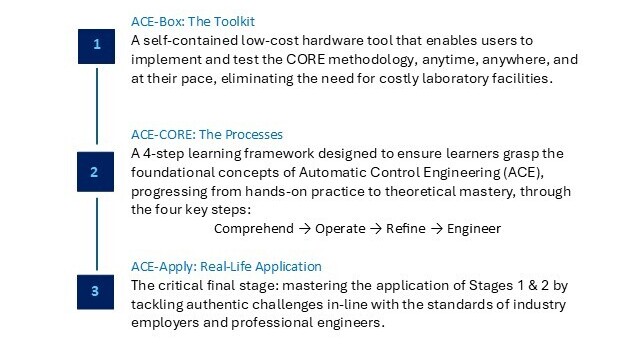
Modern engineering is increasingly digital, interconnected, and system oriented. To prepare students for this evolving landscape, the Automatic Control Engineering (ACE) Model offers  a systems-driven, application-focused framework for practical control engineering education. Developed through a MathWorks-funded project launched in the summer of 2025, the ACE-Model unifies three complementary components that together cultivate systems thinking and model-based systems engineering competence: 

Learners have the opportunity to: 

Teachers have the opportunity to: 


What does the ACE-Model consist of?:


Figure 1: The ACE-Model: Integrating the Toolkit (ACE-Box), with the Processes (ACE-CORE), to Lead to the Real-Life Application (ACE-Apply) to build a progressive mastery in Automatic Control Engineering (ACE).

The ACE-Model is closely aligned with Bloom’s Taxonomy, see (Anderson and Krathwohl, 2001) and Figure 2(a) providing a structured pathway for students to progress through the cognitive hierarchy, while developing capabilities across multiple levels of system abstraction. Figure 2(b) offers a schematic view of the three stages of the ACE-Model, as introduced in Figure 1. An initial overview of the ACE-Model is presented here, with further details provided in the following sections.  

 The ACE-Box is a portable, self-contained hardware tool that brings ACE to life beyond the traditional costly, full-scale laboratories. All that is required is a laptop and the ACE-Box. Designed to support the ACE-CORE methodology, ACE-Box can be set up on a desk, in a classroom, or even at home. MATLAB and Simulink serve as the primary platforms for model-based design, enabling system modelling, control system development, and the deployment of control algorithms to physical hardware (e.g. Arduino Uno) through code generation tools. 

 ACE-CORE guides learners through successive levels of Bloom’s framework: 

At each stage of CORE, learners move from recognising system components to synthesising complex interactions, mirroring the systems engineering lifecycle from requirement capture through verification and validation. This alignment supports AHEP4’s emphasis on analytical and problem-solving competence and INCOSE’s System Definition and Integration competencies. 

Finally, learners progress to Create, the highest stage of Bloom’s Taxonomy, by applying their knowledge to design complete control systems for real-world applications such as drones, vehicles, and automation systems. In this way, the ACE-Model scaffolds learning in parallel with Bloom’s progression, from foundational comprehension to advanced problem-solving, design and innovation. 

Together, these three pillars form a cohesive learning ecosystem: the toolkit, the process, and the application. 
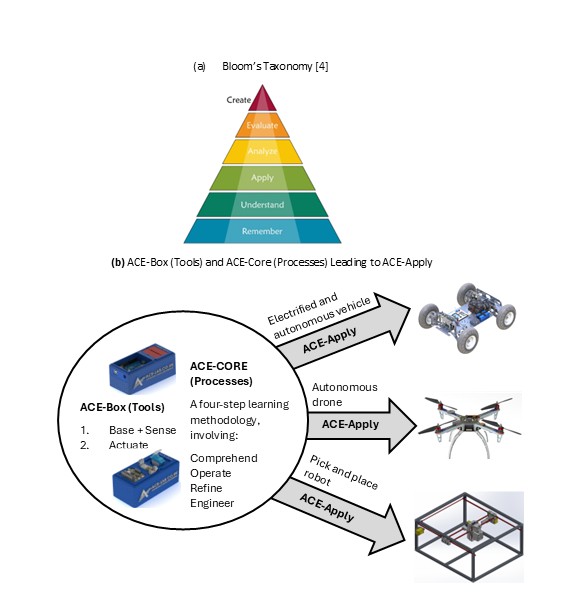
Figure 2: Bloom’s Taxonomy (Anderson and Krathwohl, 2001) (a) and the ACE-Model Three Stages (b).


Collaborative community:

The ACE-Model ‘sits’ within the ACE-Lab, a collaborative community of academics and industry professionals committed to developing, validating, and disseminating open-access systems education resources. The ACE-Lab approach embodies complex adaptive systems principles, where the community evolves through continuous feedback, iteration, and co-design. Membership to the ACE-Lab is open to anyone who shares our vision of advancing control engineering teaching tools and practices. Through this approach, the ACE-Model equips graduates with the knowledge and hands-on skills required to excel in modern ACE careers. Find out more about the ACE-Lab through the following website: www.ace-lab.co.uk 

As an evolving community, ACE-Lab continually expands its open-access content through the active contributions of its members. New materials are regularly developed and shared, ensuring the resources remain current and relevant. Through this dynamic, collaborative approach, embodied in the ACE-Model, students not only gain technical knowledge but also develop the capacity to understand, navigate, and work effectively with complex, interconnected engineering systems. 


ACE-Box: The toolkit:  

The ACE-Box is based on the early development work of Control-Lab-in-a-Box (Pickering, 2023; 2025). CLB integrates sensors, actuators, and microcontroller to allow students to experience dynamic behaviour, and feedback control. 

 For now, two ACE-Box kits have been developed: 

1. Base and sense 

2. Actuate  

 The ACE-Box (base and sense) is illustrated in Figure 3, with the 15 key components labelled, along with an exploded view of the main parts in Figure 4. The ACE-Boxes integrate the essential microcontrollers, electronics, sensors, and actuators needed to design, implement, and test elements of digital control algorithm development, e.g. control algorithms in real time. It bridges the gap between theory and practice, allowing learners to see how abstract concepts behave in physical systems. The ACE-Box is also available as an open-access resource, with laboratory exercises included, with details provided later in this article. The ACE-Box (labelled (1) in Figure 3) and the tray (labelled (2) in Figure 3) are manufactured using 3D printing, with the necessary files available on the project website referenced above. A list of the required components and their sources is also provided on the project website, corresponding to labels (3) to (15) in Figure 3. Due to the open-source design of ACE-Lab, the library of exercises will continue to expand, supported by contributions from both academia and industry. The ACE-Box (Actuate) is illustrated in Figure 5, with the key actuator components detailed in (a), along with some typical lab set-ups (b, c and d). Figure 6 illustrates both the ACE-Box (Base + Sense) and also ACE-Box (Actuate).    
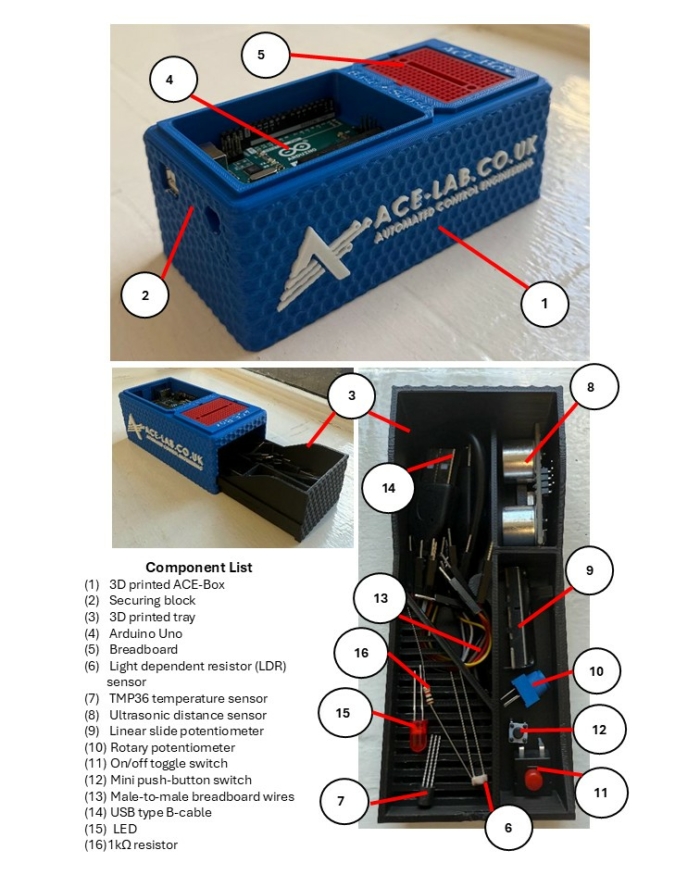
Figure 3: The ACE-Box (Base and Sense).
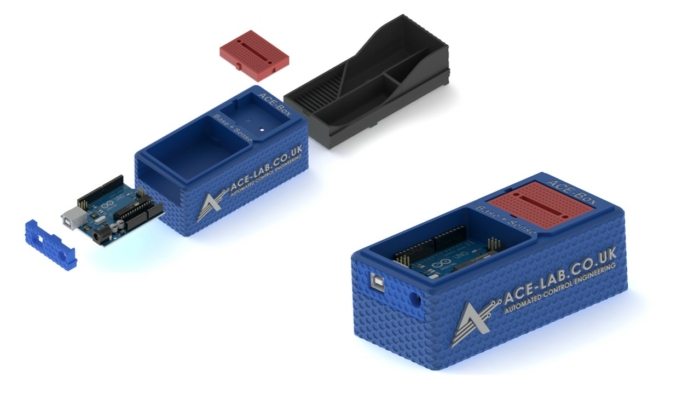
 

Figure 4: Assemble of the 3D Printed ACE-Box (Base and Sense).
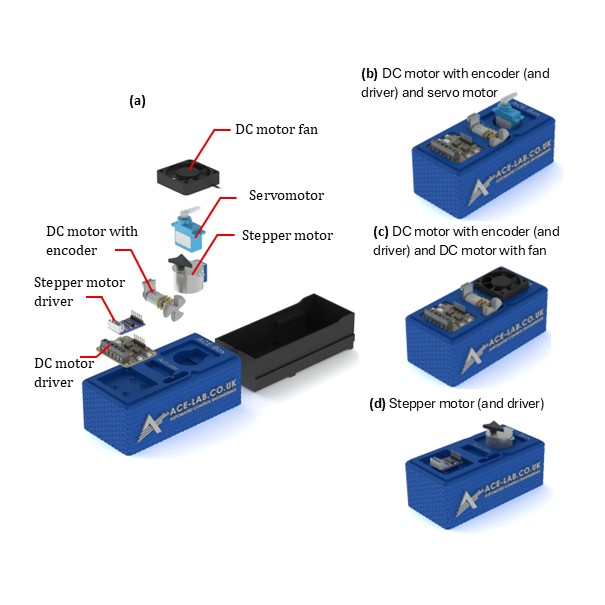
 

Figure 5: The ACE-Box (Actuate).
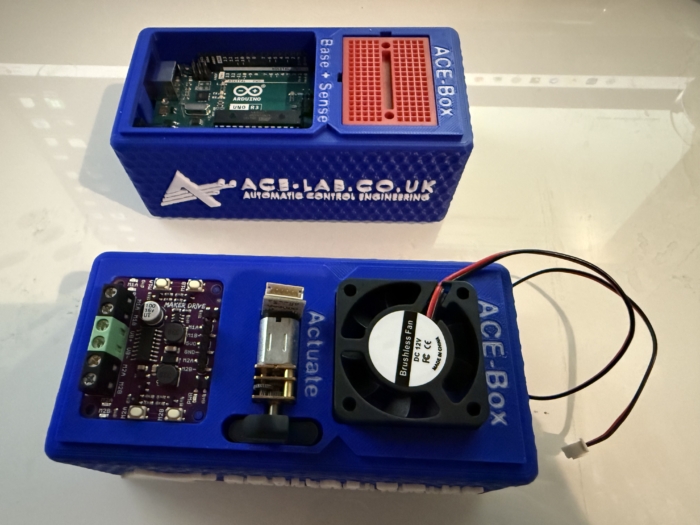
 

Figure 6: ACE-Box (Actuate) Alongside the ACE-Box (Base + Sense).


ACE-CORE: The methodology:

ACE-CORE is a four-step framework designed to scaffold learning from components to system-of-systems understanding: 

The methodology explicitly develops systems thinking, and integration competencies, core to both AHEP4 and INCOSE frameworks.  

ACE-CORE is intentionally designed to offer a scaffolded learning experience, allowing students to build confidence step by step as they deepen their understanding. Due to its flexible structure, students can also follow a completely practical route, i.e. avoiding the modelling and simulation. The emphasis is not on rote memorisation of theory, but on progression through understanding the fundamentals of control engineering, e.g. the components that form a feedback control system. These routes enable learners to apply concepts in practical control engineering contexts and develop genuine competence. 


ACE-Apply: Real-world application:

ACE-Apply is the project stage, where the skills and knowledge gained from ACE-Box and ACE-CORE are consolidated by tackling authentic challenges aligned with the expectations of industry and professional engineers, see Figure 2. At this stage, learners prove their mastery by addressing engineering application problems that reflect the standards of industry practice. The focus is on: 

This stage reinforces AHEP4 Themes 3 and 5, particularly:  

It also strengthens INCOSE competencies in System Realisation, Integration, and Technical Project Management, encouraging students to act as systems integrators capable of managing interfaces and dependencies across mechanical, electrical, and software domains.   

By bridging theory, simulation, and hardware using industry-standard digital tools, ACE-Apply nurtures the ability to navigate complex adaptive systems, anticipate emergent behaviour, and work collaboratively within multidisciplinary engineering ecosystems.  


ACE-Box activities:

Upon visiting the ACE-Lab website (www.ace-lab.co.uk), under the tab ‘ACE-Box’, the following tabs exist (with the links provided):  

The “What is the ACE-Box?” page introduces educators and students to the ACE-Box platform, outlining its purpose, key features, and practical considerations such as sourcing components and 3D-printing enclosure parts.  

The “Prior Exercises” page provides essential onboarding material designed to help users become familiar with MATLAB and Simulink. This includes links to the relevant OnRamp courses, guidance on installing the required software packages, and short tutorial videos that introduce the MATLAB and Simulink graphical user interfaces (GUIs).  

The “Base + Sense” section contains a set of introductory tutorial exercises that use the ACE-Box (Base + Sense configuration). These activities help users get started with Simulink code generation for the Arduino Uno, while working with a range of basic sensors and electronic components.  

Finally, the “Base + Sense + Actuate” section builds on the previous material by introducing actuation hardware. Using both the Base + Sense and Actuate modules, students and educators learn how to interface with and control devices such as DC motors, servomotors, and stepper motors. This section is designed to familiarise users with actuator integration and reinforce practical control engineering workflows.  


Example use of ACE-Box (Base + Sense):

To demonstrate the use of the ACE-Box (Base + Sense), an introductory activity is provided, i.e. the on-off blinking of an LED. Prior to this activity, through ACE-CORE, students should receive a short introduction to microcontrollers covering key concepts such as digital input/output pins, analogue pins, and pulse-width modulation (PWM). Once students are familiar with these fundamentals, they progress to the initial exercise detailed here, which is aligned with defined learning outcomes. 

Since MATLAB and Simulink are the primary software tools used with the ACE-Box, students are first guided through installing the Simulink Support Package for Arduino Hardware. After the hardware and software setup is complete, they assemble a simple circuit, see Figure 7(a), and configure a Simulink model for the first exercise, see Figure 6(b). This initial activity requires students to control the state of a digital output pin on the Arduino, switching it on and off. The Simulink model, provided in Figure 7(b), enables students to quickly build the exercise using a visual programming approach. To run the activity, they follow a sequence of steps that includes code generation, which compiles the Simulink model into embedded C code and deploys it onto the Arduino Uno microcontroller. Once completed, the LED connected to the circuit blinks on and off according to the settings of the Simulink pulse generator. A visual of the complete set-up for this initial exercise can be found in Figure 8. At this stage, students are encouraged to experiment with the pulse generator parameters in real-time, observing how changes to the signal properties immediately affect the LED’s behaviour. Scopes can also be used (see Figure 7(b)) to visualise the pulse generator’s square-wave output, including its amplitude, period, and pulse width. This hands-on interaction reinforces the link between the initial set-up and hardware implementation while deepening their understanding of microcontrollers. 
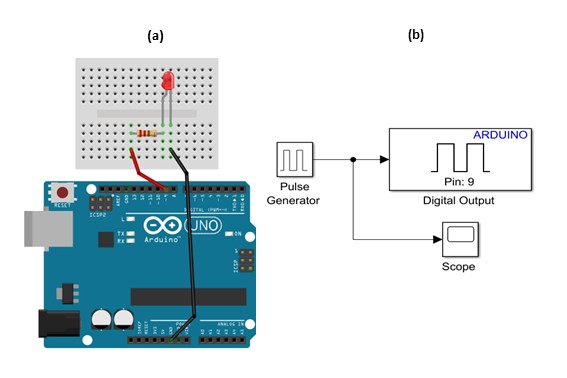
Figure 7: LED Simple Circuit (a) and Simulink for Code Generation for the on-off Blinking of an LED.
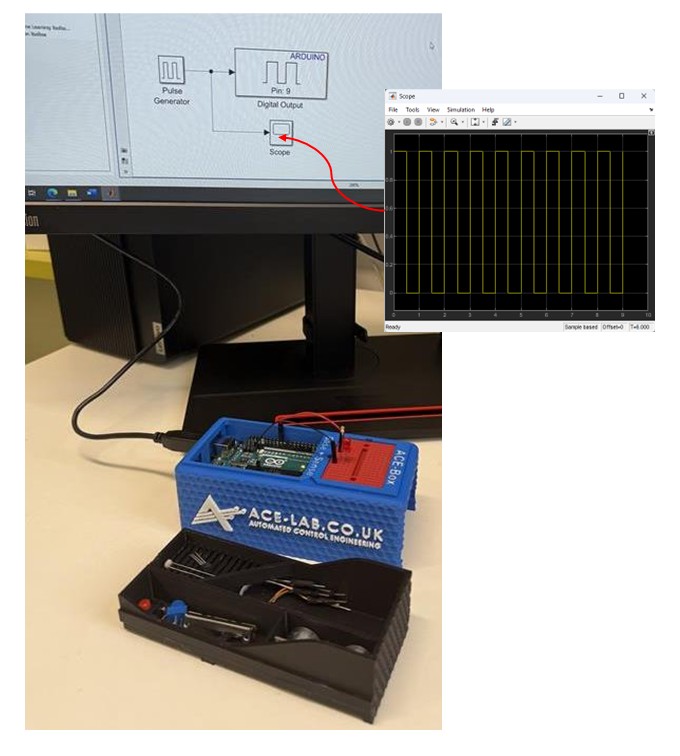
Figure 8: LED Simple Circuit Set-Up using Simulink for Code Generation for on-off Blinking of an LED.

The initial exercise is designed to familiarise students with the ACE-Box and the use of Simulink’s code generation tools. This type of activity is typical for introducing students to a new software and hardware environment. The next exercise involves using pulse width modulation (PWM) to vary the brightness of the LED. This exercise involves using additional blocks in Simulink, see Figure 8, where multiple scopes are used to visualise the signals in real-time. Once students understand the fundamental building blocks of Simulink, they can quickly progress to developing feedback control systems that meet a variety of application requirements. In the authors’ view, student familiarity with Simulink makes it a more accessible platform for designing advanced control algorithms, particularly when working with sub-systems. 
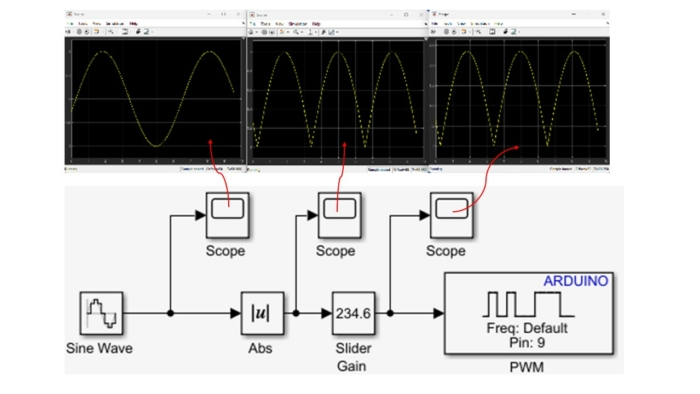
Figure 9: LED Simple Circuit Set-Up using Simulink for Code Generation Varying Brightness of an LED using Pulse Width Modulation (PWM).

Building on this foundation, a wide range of laboratory exercises can be developed using the electronic components involved in ACE-Box (Base + Sense), as illustrated in Figure 3, with the option to expand further by incorporating additional components. Examples of extended exercises include: 

In addition to sensing activities, the ACE-Box (Actuate) provides four actuators: a servomotor, a DC motor with encoder, a stepper motor, and a DC motor fan. This unit can be used independently or in combination with the Base and Sense ACE-Box to enable more advanced control experiments, such as DC motor speed control or motor control based on light intensity measurements from an LDR. 

The flexibility of the ACE-Box system ensures that the number of possible exercises is effectively unlimited, as new experiments can be designed by combining existing sensors and actuators or by integrating additional measurement devices. This also allows unique coursework assignments to be created. 


Summary:

The ACE-Model provides a systemic and holistic framework for practical control engineering education that: 


Acknowledgements:  

Dr James E. Pickering gratefully acknowledges the support from MathWorks, whose funding made this project possible. He also extends his sincere thanks to Hari Sudeskkumar for his exceptional engineering design contributions and 3D-printing work. The authors would like to thank the Project Advisory Group (PAG) for their valuable guidance throughout the development of this work.  


References:


Any views, thoughts, and opinions expressed herein are solely that of the author(s) and do not necessarily reflect the views, opinions, policies, or position of the Engineering Professors’ Council or the Toolkit sponsors and supporters.  

Join us for the official launch of the EPC’s new Complex Systems Toolkit, supported by Quanser, on Tuesday 9th December 2025, 3pm-4.30pm GMT.

To register, and find out more about the programme and speakers, click here.

Find out more and register here: https://epc.ac.uk/event/complex-systems-toolkit-launch-webinar/

The EPC’s Complex Systems Toolkit, supported by Quanser, is an open-access online resource to help engineering educators build complex systems concepts directly into their teaching and prepare future engineers for tomorrow’s challenges.

We would like to ensure that all universities with Engineering departments are aware of the toolkit and able to make use of it. To this end, we’ve produced a pack of resources that can be distributed to relevant departments and staff members such as Engineering department heads, staff and administrators, as well as Vice-Chancellors, Deans, and anyone else who may find our resource useful in teaching or curriculum development.

We would be very grateful if you could share these resources, and encourage you to explore and use them in your teaching.

Our pack of resources to help you present and promote the Complex Systems Toolkit contains the following files, and can be downloaded individually below, or as a pack from here.


Information on the toolkit (PDF)


Sample resources (PDF)


Promotional (PDF)


Images (JPG/PNG)


PowerPoint slides (pptx)


If you have any questions or comments about this resource, please contact Wendy Attwell.


Any views, thoughts, and opinions expressed herein are solely that of the author(s) and do not necessarily reflect the views, opinions, policies, or position of the Engineering Professors’ Council or the Toolkit sponsors and supporters.

Media release 

Release date: 1st December 2025

New toolkit helps tomorrow’s engineers understand complex systems

A new, free resource, launched today by the Engineering Professors’ Council, will provide an open-access online toolkit to help engineering educators build complex systems concepts directly into their teaching and prepare future engineers for tomorrow’s challenges.

The Complex Systems Toolkit, created by the Engineering Professors’ Council (EPC) in partnership with Quanser, helps engineers to learn to tackle an increasing range of factors that interact in unpredictable ways. This fills a critical gap in traditional engineering education, where students tended to learn subjects in controlled and isolated conditions.

The new toolkit gives educators a set of resources to teach students to understand and design systems that are not only technically sound, but also resilient, trustworthy, and ethically robust. This involves learning to analyse, model and navigate complexity, to collaborate across disciplines, and to manage complex technical and sociotechnical systems.

It is not just students who benefit. Learning how to integrate complex systems in engineering also supports educators in their own professional development, since many may themselves never have been taught the necessary knowledge, skills, and mindsets that they are now expected to teach.

The Complex Systems Toolkit solves these challenges with a suite of guidance articles, teaching materials and case studies helping to build essential competencies for future engineers, in order to ensure a safer and more equitable world.

Integrating complex systems into engineering teaching aligns with professional standards and accreditation requirements, and also complements institutional goals around interdisciplinarity, sustainability and EDI, allowing the UK to position itself as a leader in engineering education that enables people and the planet to thrive.

The development of the Toolkit was guided by a Working Group comprised of experts from academia, industry and professional bodies. They have worked to produce a toolkit, rooted in educational best practice, that is aligned with the UK Engineering Council’s Accreditation of Higher Education Programmes (AHEP) criteria (the conditions for courses to receive professional accreditation) as well as addressing competencies outlined by the International Council on Systems Engineering (INCOSE).

The Toolkit features advice to educators who want to teach complex systems but are not sure where to begin, as well as ready-to-use classroom resources including case studies and activities that highlight current and emerging real-world issues and can be used and adapted by anyone.

Dr. Nikita Hari, Head of the Teaching and Research Design Support Group at the Department of Engineering Science, University of Oxford, and Working Group Co-Chair comments: “Engineering graduates of today are expected to design climate-resilient cities, ethically deploy AI, and weave circular-economy thinking into supply chains – and all this lives squarely in the messy realm of complex systems. Yet most engineering curricula still treat complexity as an afterthought or a niche elective. This is often misunderstood, misrepresented, or purely ignored, relegating complexity to a footnote.

“The Engineering Professors’ Council’s Complex Systems Toolkit is our academic response, aiming to bridge this gap: a freely accessible, peer-reviewed, resource hub where academics can find, curate and share ready-to-teach resources, assessment blueprints and real-world case studies mapped to AHEP learning outcomes.”

Paul Gilbert, CEO of Quanser, adds: “At Quanser, our mission has always been to help educators bring authentic, system-level engineering experiences to their students. Partnering with the EPC on the Complex Systems Toolkit is a unique opportunity to extend that mission in a way that truly scales. This Toolkit brings academic insight and practical, real-world systems thinking together in a way that empowers educators everywhere. I’m proud of what we’ve created together, and even more excited for how it will help shape the next generation of engineers to thrive in a world defined by complexity.”

An online launch of the Toolkit will take place on 9th December at a free webinar, during which attendees will be given a tour of its contents. To attend, register at https://epc.ac.uk/event/complex-systems-toolkit-launch-webinar/

The Complex Systems Toolkit is an open access and free to use suite of resources, available at http://epc.ac.uk/complex-systems-toolkit

A full press pack can be downloaded from: https://www.dropbox.com/scl/fo/cyqsu43psebige4s9ym0z/APr2oJC_8A0xGnumvCPkUX0?rlkey=e6zyq6b5ab8v6jh3423l6oj0h&st=div86irp&dl=0

Ends 


Notes to editors 


Contact 

Contact: Johnny Rich

Email: press@epc.ac.uk

Phone: 0781 111 4292

Website: https://epc.ac.uk/resources/toolkit/complex-systems-toolkit/

LinkedIn: https://www.linkedin.com/company/engineering-professors’%E2%80%8B-council

Tags: #ComplexSystems #ComplexSystemsToolkit


This post is also available here.

The EPC’s Complex Systems Toolkit is now live, providing accessible, practical resources for embedding complex systems concepts into engineering education. The Complex Systems Toolkit is supported by Quanser.

Dive into the ‘what’ and ‘how’ of complex systems with our knowledge and guidance articles, and discover our ready-to-use teaching resources, including case studies and other classroom activities. Come along to our official launch webinar on 9th December for a live demo, and to hear directly from the creators and partners who helped shape the ToolkitRegister here. If you can’t join us for the live webinar, register anyway and we’ll send you a link to the recording as soon as it’s available.


Why do we need a Complex Systems Toolkit?


What does the Toolkit provide?


How was the Toolkit developed?


Contents

The toolkit currently includes the following, but it is a growing resource and we will be adding further content soon.


Our supporters

These resources have been produced by the Engineering Professors’ Council in partnership with Quanser.


Licensing

To ensure that everyone can use and adapt the toolkit in a way that best fits their teaching or purpose, most of this work is licensed under a Creative Commons Attribution-ShareAlike 4.0 International License. Under this licence you are free to share and adapt this material, under terms that you must give appropriate credit and attribution to the original material and indicate if any changes are made.


More to come

We are already working on expanding this Toolkit with further Knowledge, Guidance and Teaching resources. Additionally, we are looking to create ‘enhanced’ versions of each case study, including specific teaching materials such as lesson plans, presentations and worksheets. For more information, please contact Wendy Attwell.


This post is also available here.


Any views, thoughts, and opinions expressed herein are solely that of the author(s) and do not necessarily reflect the views, opinions, policies, or position of the Engineering Professors’ Council or the Toolkit sponsors and supporters.
Toolkit: Complex Systems Toolkit.

Author: Professor Michael Ward, CEng, FIMechE, FIET (University of Strathclyde).

Topic: Defining and understanding complex systems.

Title: The role of Wicked Problems thinking to help understand the extent of engineering involvement in complex systems.

Resource type: Knowledge article.

Relevant disciplines: Any.

Keywords: Available soon.

Licensing: This work is licensed under a Creative Commons Attribution-ShareAlike 4.0 International License. The work on which this project has been based was funded by the Engineering and Physical Sciences Research Council of the UK through the UK FIRES Program (EP/S019111/1) and the Future Electrical Machines Manufacturing Hub (EP/S018034/1). Earlier work supported by High Value Manufacturing Catapult has also been essential in developing the basis for this work.

Downloads: Available soon.

Who is this article for?: This article should be read by educators at all levels in higher education who are seeking an overall perspective on teaching approaches for integrating complex systems in engineering education. 

Related INCOSE Competencies: Toolkit resources are designed to be applicable to any engineering discipline, but educators might find it useful to understand their alignment to competencies outlined by the International Council on Systems Engineering (INCOSE). The INCOSE Competency Framework provides a set of 37 competencies for Systems Engineering within a tailorable framework that provides guidance for practitioners and stakeholders to identify knowledge, skills, abilities and behaviours crucial to Systems Engineering effectiveness. A free spreadsheet version of the framework can be downloaded. 

This resource relates to the Systems Thinking and Critical Thinking INCOSE competencies. 

AHEP mapping: This resource addresses several of the themes from the UK’s Accreditation of Higher Education Programmes fourth edition (AHEP4):  Analytical Tools and Techniques (critical to the ability to model and solve problems), and Integrated / Systems Approach (essential to the solution of broadly-defined problems).  


Premise:

Engineering is crucial to achieving imperatives such as decarbonisation. Yet engineering typically addresses specific, well-defined challenges rather than broad, ambiguous ones. Education and practice reinforce this approach, with even postgraduate and academic engineers often focusing on problem depth over breadth. While this produces deep technical insights and tangible technological capability, it risks delaying uptake and impact unless multidisciplinary teams are involved. Recognising this gap between aspirations and execution suggests a role for structured frameworks and tools to trigger bridging activity. Wicked problem thinking is a way to understand complex problems and systems thinking, and it is related to situations which are ambiguous, contested, sometimes lacking an end state, evolving over time, requiring collaboration, adaptability, and inherently cross-disciplinary.  


Background:

Climate change is a helpful case in illustrating the gap between global ‘wicked’ problems, and the work of the engineer.  Engineering’s success, by underpinning industrialisation and thereby enabling mass consumption, can also be seen as its biggest failing in contributing to climate change (Datea & Chandrasekharana, 2022) and other environmental impacts. Going forward, engineers must help mitigate it, through better deployment of existing technologies and creation of new ones.  Clearly climate change is complex, spanning scientific, technological, behavioural, and political dimensions, and this complexity limits what can be achieved solely from engineering consideration. Conventional engineering methods, though highly effective at the project and programme level, risk drifting away from the original issue and producing isolated solutions with limited systemic effect. 


Wicked problems thinking:

Global challenges like climate change are sometimes labelled “super-wicked” problems—time-limited, caused partly by the problem-solvers, lacking central authority, and often deferred (Levin et al.). In engineering, wicked problems present a risk, because engineers are inherently tasked with addressing a part of the wider problem and often via particular approaches.  Perhaps it is not surprising, then, that engineers are trained for structured problems with clear solution methods (Schuelke-Leech, 2021). Unfortunately such approaches are rarely transferable directly to wicked contexts, except when problem structure and solution approaches align unusually well. Education reinforces this, as engineering curricula focus on well-defined challenges (Lönngren, 2017).   

At the research level, problems are often entangled, requiring both high-level perspective and detailed work. Sustainable engineering science (Seager et al., 2012) calls for ethical awareness, adaptive methods, and “interactional expertise” drawn from other disciplines. While this opens opportunities to measure cause and effect across scales, tangible short-term indicators often dominate. 


A structured approach to Wicked Problems:

Alford & Head’s (2017) typology places problems on a spectrum from “Tame” to “Very Wicked.” Most engineering projects are tame, even when complex, because specification and management processes reduce ambiguity. Issues like decarbonisation-related engineering research, however, often involves wicked characteristics.  This framework has recently been extended (Fehring, 2025) to allow consideration of a wider range of engineering research scenarios, Figure 1.   


Figure 1.  A framework for categorising complexity of engineering research scenarios (Fehring) 


Each of the identified scenario types is somewhat distinctive, as follows: 


Conclusions:


References:


Any views, thoughts, and opinions expressed herein are solely that of the author(s) and do not necessarily reflect the views, opinions, policies, or position of the Engineering Professors’ Council or the Toolkit sponsors and supporters. 
Toolkit: Complex Systems Toolkit.

Author: Onyekachi Nwafor (KatexPower).

Topic: Complex systems modelling in renewable energy transition.

Title: Island energy transition.

Resource type: Teaching – Case study.

Relevant disciplines: Electrical engineering; Systems engineering; Environmental engineering; Computer science; Energy.

Keywords: Available soon.

Licensing: This work is licensed under a Creative Commons Attribution-ShareAlike 4.0 International License. 

Downloads: Available soon.


Related INCOSE Competencies: Toolkit resources are designed to be applicable to any engineering discipline, but educators might find it useful to understand their alignment to competencies outlined by the International Council on Systems Engineering (INCOSE). The INCOSE Competency Framework provides a set of 37 competencies for Systems Engineering within a tailorable framework that provides guidance for practitioners and stakeholders to identify knowledge, skills, abilities and behaviours crucial to Systems Engineering effectiveness.   A free spreadsheet version of the framework can be downloaded.

This resource relates to the Systems Thinking, Systems Modelling and Analysis, Configuration Management, Requirements Definition, Communication, Verification, and Validation INCOSE Competencies. 

AHEP4 mapping: This resource addresses several of the themes from the UK’s Accreditation of Higher Education Programmes fourth edition (AHEP4): Analytical Tools and Techniques (critical to the ability to model and solve problems), and Integrated / Systems Approach (essential to the solution of broadly-defined problems). In addition, this resource addresses the themes of Sustainability and Communication. 

Educational level:  Advanced.


Learning and teaching notes:

Overview: 

This multi-part case study guides students through the complex systems challenges of Prince Edward Island, Canada’s ambitious 100% renewable energy transition by 2030. Students will experience how technical, social, and economic factors interact through emergence, feedback loops, and multi-scale dynamics that traditional engineering analysis alone cannot capture. 

Learners have the opportunity to: 

Teachers have the opportunity to: 


Learning and teaching resources:


Overview: Energy transition as a complex systems challenge:

Prince Edward Island (PEI), Canada’s smallest province, aims to achieve 100% renewable electricity by 2030. Its small grid, dependence on imported power, and growing renewable infrastructure make it a natural laboratory for systems thinking in energy transitions. 

This case invites students to explore how technical, social, and policy decisions interact to shape renewable integration outcomes. Using complexity-science tools, they will uncover how local actions produce emergent system behaviour, and why traditional linear models often fail to predict real-world dynamics. 


The complex challenge:
Traditional engineering approaches often treat energy systems as predictable and linear, optimising components like generation, transmission, or storage in isolation. However, energy transitions are complex socio-technical systems, characterised by feedback loops, interdependencies, and emergent behaviours. 

In PEI’s case, replacing stable baseload imports with variable wind and solar generation creates cascading effects on grid stability, pricing, storage demand, and social acceptance. The island’s bounded geography magnifies these interactions, making it an ideal context to observe emergence and system-level behaviour arising from local interactions. 

PEI’s energy system presents a fascinating case study of complex systems, where interactions between wind generation, energy storage, demand patterns, and grid infrastructure create emergent behaviours that cannot be predicted from individual components alone. Currently, PEI generates approximately 25% of its electricity from on-island wind farms, with the remainder imported via submarine cables from New Brunswick.  


Part one: Understanding system complexity 

The integration paradox:

PEI currently imports about 75% of its electricity via two 180 MW submarine cables, while 25% is produced locally through onshore wind farms (204 MW). Plans for offshore wind, community solar, and hydrogen projects have triggered debates around stability, affordability, and social acceptance. 

Taking on the role of an engineer at TechnoGrid Consulting, students are tasked to advise Maritime Electric, the island’s utility, on modelling strategies to guide $2.5 billion in renewable investments. 

Competing goals:

Discussion prompt: 

In systems terms, where do you see tensions between policy, technology, and society? How might feedback loops amplify or mitigate these tensions? 


Part two: Mapping system complexity – What counts as ‘the system’?:

While Maritime Electric’s engineering team insists the project scope should stay strictly technical, limited to grid hardware, generation, and storage, policy advisors argue that social behaviour, market pricing, and community engagement are part of the system’s real dynamics.

Expanding boundaries makes the model richer but harder to manage; narrowing them simplifies computation but risks missing the very factors that determine success. 

Activity 1: Boundary definition: 

Map the PEI energy system by identifying: 

Discuss how including or excluding elements (e.g., electric-vehicle uptake, community cooperatives, carbon policy) changes the model’s focus and meaning. 

Learning insight: 

Complex systems cannot be fully understood in isolation; boundaries are analytical choices that shape both perception and leverage. Every inclusion or exclusion reflects an assumption about what matters and that assumption determines which complexities emerge, and which stay hidden. 


Part three: Modelling the system: Multiple lenses of complexity:

(a) Agent-Based Modelling (ABM) with NetLogo: 

Students construct simplified models of households, businesses, and grid operators: 

Emergent patterns such as adoption S-curves or network clustering illustrate how simple local rules generate complex collective dynamics. 

(b) System Dynamics (SD) with Vensim: 

Students then develop causal loop diagrams capturing key feedbacks: 

This provides a macroscopic view of feedback, delay, and leverage points. 

(c) Network Analysis with Python (NetworkX):

Students model actor interdependencies: how households, utilities, industries, and regulators interact. Network metrics (centrality, clustering, connectivity) reveal where resilience or vulnerability is concentrated. 

Reflection prompt: 

Which modelling approach offered the most insight into system-level behaviour? What were the trade-offs in complexity and interpretability? 


Part four: Scenario exploration: Pathways to 2030:

Students explore three transition scenarios, each with distinct emergent behaviours: 

A. Distributed Solar + Community Storage  300 MW solar, 150 MWh batteries  Decentralised coordination challenges and social clustering effects. 
B. Offshore Wind + Grid Enhancement  400 MW offshore wind, new 300 MW interconnection  Weather-dependent reliability and cross-border dependency. 
C. Hybrid + Hydrogen Production  200 MW offshore wind, 100 MW solar, 50 MW electrolysis  Multi-sector coupling and feedback between hydrogen and electricity markets 


Activity 2: Comparative Scenario Analysis 

Run simplified models for each pathway. Track how feedback loops evolve over time and identify points of instability or resilience. 

Inquiry questions: 


Part five. Dealing with uncertainty: 

Complex systems resist deterministic prediction. Instead, students use Monte Carlo simulations or sensitivity tests to explore uncertainty. 

Activity 3: Communicating uncertainty:

Students prepare short policy memos to government or utility executives: 

Learning outcome: 

Effective system modelers communicate uncertainty transparently and use it to support adaptive decision-making. 


References: 

Modelling Software and Tutorials:


Any views, thoughts, and opinions expressed herein are solely that of the author(s) and do not necessarily reflect the views, opinions, policies, or position of the Engineering Professors’ Council or the Toolkit sponsors and supporters.  
Toolkit: Complex Systems Toolkit.

Author: Professor Nici Zimmermann (University College London).

Topic: Illuminating complex interactions in a system through participatory modelling methods.  

Title: Using a participatory modelling approach to urban regeneration.

Resource type: Teaching activity.

Relevant disciplines: Any; civil engineering.

Keywords: Available soon.

Licensing: This work is licensed under a Creative Commons Attribution-ShareAlike 4.0 International License. 

Related INCOSE Competencies: Toolkit resources are designed to be applicable to any engineering discipline, but educators might find it useful to understand their alignment to competencies outlined by the International Council on Systems Engineering (INCOSE). The INCOSE Competency Framework provides a set of 37 competencies for Systems Engineering within a tailorable framework that provides guidance for practitioners and stakeholders to identify knowledge, skills, abilities and behaviours crucial to Systems Engineering effectiveness.  A free spreadsheet version of the framework can be downloaded.

This resource relates to the Systems Thinking, Systems Modelling and Analysis and Critical Thinking INCOSE competencies. 

AHEP mapping: This resource addresses several of the themes from the UK’s Accreditation of Higher Education Programmes fourth edition (AHEP4):  Analytical Tools and Techniques (critical to the ability to model and solve problems), and Integrated / Systems Approach (essential to the solution of broadly-defined problems). In addition, this resource addresses the AHEP themes of Design and Practical and workshop skills. 

Educational level: Intermediate or advanced.


Learning and teaching notes: 

This activity is suitable for those having acquired some familiarity with complex systems and related concepts – especially causal loop diagrams, stock and flow diagrams, cognitive maps or participatory maps – who are looking for additional ideas for activities or who have a specific interest in participatory modelling. The activity is also useful at the point when students learn about interaction between different elements of a complex system or when they learn about the importance of human factors. 

Learners have the opportunity to:  

Teachers have the opportunity to: 


Downloads: 


Learning and teaching resources:


Overview:

This activity introduces students to a participatory systems thinking – or more specifically –  participatory modelling exercise. This is an approach used in group settings to explore complex issues and represent them via models. In this activity, students assume the roles of stakeholders involved in an urban regeneration project and take part in a group model-building workshop.  

It teaches students core principles of a participatory modelling method called group model-building or participatory system dynamics, but it can also be used to teach the underlying system structure of a specific phenomenon. This makes it well-suited for modules that contain elements of systems thinking and system dynamics (including causal loop diagramming and simulation modelling) or modules that contain an element on group facilitation and participatory methods.  

The activity is designed to run over 1.5 to 2.5 hours and is adaptable. While the current example focuses on the phenomenon of urban dynamics around the population development in a city, the activity can be reframed using a case and model from a project management, water management, energy or other sustainability-related context. 

The activity is directly aligned with systems thinking by immersing students in a participatory modelling process. It develops students’ awareness of system content and its interactions by teaching them qualitative modelling skills. It develops their skills in managing complexity and representing system elements with visual models consisting of items and their relationships depicted in causal loop diagrams and/or stock and flow diagrams. This serves to build students’ analysis skills and ability to apply systems approaches to problems. It also develops their practitioner, practical and workshop skills of collaborating with stakeholders. It does so by advancing their facilitation skills essential for collaborative systems work. This includes rules of conduct and techniques for managing a group discussion and group dynamics, making a broad range of ideas heard, prioritising them and mapping them visually. 


Materials or software required:

For in-person sessions, the following materials are recommended: 

If software or an online tool are used, these are used to collate concepts (variables suggested by students) and to build a diagram of their interactions. This will be projected to the in-person and/or online participants, replicating the participatory nature of in-person workshops. 


Detailed explanation of the activity:  

This activity introduces students to participatory modelling, an approach used in group settings to explore and understand complex issues and represent them via models. In this case, participatory modelling is introduced through a structured group model-building workshop, using a simplified version (Alfeld & Graham, 1976; Richardson, 2014) of Jay Forrester’s (1969) famous Urban Dynamics model, which sparked quite some debate because of its counter-intuitive insights. The session begins with a brief historical overview of urban growth and decline in major cities up to the 1980s (e.g. New York, Boston, London; see files under ‘Downloads’, above), before focusing on the London Docklands in London in 1981, as an example of an opportunity for urban redevelopment to counter the trend of population decline. Student groups are assigned stakeholder roles from that time, including the founder of the London Docklands Development Corporation (1–2 students), the Surrey Quays Housing Action Group (2–6 students), the London Chamber of Commerce (2–6 students) and the Greater London Council (2–6 students). Each student group receives a role sheet outlining their perspective and a small set of key variables relevant to their stakeholder position (see linked files). These variables are intentionally curated to align with the Urban Dynamics model and to ensure that collaboration is necessary to draw the interlinkages between the variables, i.e. the relevant system structure.  

A list of variables provided to the student groups via the role sheets is included below. Note that not all variables that are necessary to draw the model are included; students need to infer a few variables to train their thinking. 

Before the workshop begins, students are introduced to core concepts of participatory modelling (see linked slides), including facilitator roles (based on Richardson & Andersen, 1995) and common workshop scripts (e.g. hopes and fears, variable elicitation, voting, model building, policy option elicitation and system storytelling, as described in Scriptapedia and Andersen & Richardson, 1997). 

The workshop proceeds in three main phases: 

1. Variable elicitation: After a short introduction by the student playing the founder of the London Docklands Development Corporation into the setting and by the facilitator/teacher into the process, each group sketches behaviour-over-time graphs of their assigned variables (10 minutes). These are presented using a round-robin or nominal group technique, meaning one variable per group at a time only, and placed on a whiteboard/blackboard or digital canvas. The round-robin collection is a technique useful to foster inclusivity and avoid talking heads. Behaviour-over-time graphs rather than just variable names are useful because the final model is believed to explain a behavioural trend over time, linking model structure and dynamics. However, it is also possible to simplify by letting students just write the variable names on sheets of paper. 

2. Voting and prioritisation: To decide on a starting point for modelling, each student votes on which variables they consider to be the most important to include in the model, e.g. giving the students as many votes as there are variables on the board and freedom of how to distribute their votes. While all variables will be included in the model, the voting activity provides a basis for reflection on different priorities and students’ personal vs. their group’s perspective, after the modelling activity. 

3. Model building: The class collaboratively constructs a stock and flow diagram (see Figure 1). Stocks such as Housing Structures, Business Structures, and Population are identified, and their net rates of change are discussed. To connect the variables, some more variables need to be added such as the ratio of population to jobs, total land available, and land occupied. To help students identify these variables, the teacher can ask questions: “Population and housing are linked by a ratio. What concepts and respective variables could link the other stocks?”. Students are encouraged to identify feedback loops and classify them as reinforcing or balancing. 

It is useful to pay attention to uncovering less obvious relationships, such as the spatial competition between housing and business infrastructure. Once the diagram is complete, the facilitator reviews the model with the class, highlighting key feedback structures. 

After the modelling activity, students can be shown images of the Docklands after the redevelopment as well as urban population trends of London and other major cities until today, prompting discussion on the long-term impacts of different types of development and prioritisation of a business vs. housing focus. The session can conclude with a reflection on the participatory process and its relevance to real-world decision-making and the value of participatory modelling in complex policy environments. 

A more comprehensive version of this activity – including a more introductory group model-building exercise that teaches basic causal loop diagramming concepts and an alternative context using project management as an example – is available: https://discovery.ucl.ac.uk/id/eprint/10160261/   


Figure 1: Stock and flow diagram of urban dynamics (produced with Vensim software). This figure is intended for educators and serves an illustrative purpose. It provides educators with a reference for how the model built during the activity is expected to look. 


Note: The author was originally inspired to focus on this case by the historical accounts found on the London Docklands Development Corporation (LDDC) History Pages (http://www.lddc-history.org.uk/index.html, now inactive).  


References:


Any views, thoughts, and opinions expressed herein are solely that of the author(s) and do not necessarily reflect the views, opinions, policies, or position of the Engineering Professors’ Council or the Toolkit sponsors and supporters.  
Toolkit: Complex Systems Toolkit.

Authors: Dr. Natalie Wint (University College London); Dr. Mohammad Hassannezhad (University College London); Dr. Manoj Ravi (University of Leeds).

Topic: Complex systems competencies.

Title: Understanding complex systems competencies required in engineering graduates. 

Resource type: Knowledge article.

Relevant disciplines: Any.

Keywords: Available soon.

Licensing: This work is licensed under a Creative Commons Attribution-ShareAlike 4.0 International License. 

Downloads: Available soon.

Learning and teaching resources:

Who is this article for?: This article should be read by educators at all levels in higher education who are seeking an overall perspective on teaching approaches for integrating complex systems in engineering education. 

Related INCOSE Competencies: Toolkit resources are designed to be applicable to any engineering discipline, but educators might find it useful to understand their alignment to competencies outlined by the International Council on Systems Engineering (INCOSE). The INCOSE Competency Framework provides a set of 37 competencies for Systems Engineering within a tailorable framework that provides guidance for practitioners and stakeholders to identify knowledge, skills, abilities and behaviours crucial to Systems Engineering effectiveness. A free spreadsheet version of the framework can be downloaded. 

AHEP mapping: This resource addresses several of the themes from the UK’s Accreditation of Higher Education Programmes fourth edition (AHEP4). 


Premise:

This article outlines the core competencies required for engineering students to effectively engage with complex systems. Such systems involve a range of technical and non-technical components that interact in non-linear and unpredictable ways. Working effectively with such complex systems requires collaboration across engineering disciplines, as well as other fields and stakeholder groups.  

Within AHEP4, complex problems are referred to as those which “have no obvious solution and may involve wide-ranging or conflicting technical issues and/or user needs that can be addressed through creativity and the resourceful application of engineering science” (p.26). The ability to work productively with complex systems is therefore essential for engineers and helps them address problems increasingly experienced in business and society, which have many interdependent components and lack clear or stable solutions.  

The aim of this article is to provide a foundational framework that integrates the knowledge, skills and attitudes necessary for undergraduate and graduate engineering students to navigate complexity. In so doing, it serves educators, curriculum designers, and students seeking to develop the mindset and skills required to tackle the challenges of the 21st century within an increasingly volatile, uncertain, complex, and ambiguous (VUCA) world (SEFI, 2025).  

This knowledge article, informed by the INCOSE Competency Framework for Systems Engineering (INCOSE, 2018), categorises complex systems competencies into eight core competencies. These competencies encompass mindset and foundations, technical methods and tools, management and delivery, and attributes and behaviours. The description of each competency references learning outcomes (LOs) outlined in AHEP4 (Engineering Council, 2025) and the International Engineering Alliance (IEA) Graduate Attributes (2021) to establish a common baseline for all engineering graduates (see Appendix for mapping).  


The eight core complex systems competencies:

1. Systems thinking and problem framing 

The ability to take a holistic approach, to consider a problem from multiple perspectives and to understand how a system’s parts interact to produce emergent behaviour.  

Students must be able to understand what makes a system ‘complex’ and move beyond narrow problem-solving to identify root causes. This involves understanding fundamental Systems thinking concepts including hierarchies and interfaces (structural dimension), holism and cause-effect (dynamic dimension), lifecycles (time dimension), and multiple perspectives (perception dimension).  

Systems thinking enables engineers to anticipate ripple effects, emergent behaviours, and trade-offs, designing solutions that remain robust under uncertainty. AHEP4 requires students to “formulate and analyse complex problems to reach substantiated conclusions” (LO2) and to “apply an integrated or systems approach to the solution of complex problems” (LO6).  

2. Critical thinking 

The ability to question assumptions, evaluate evidence, apply logical reasoning, and justify decisions based on reasoned arguments and evidence.  

Navigating complex systems involves working with a variety of (often conflicting) goals, information, and data types from across discipline and stakeholder groups. Critical thinking is thus necessary to enable engineers to identify biases, avoid oversimplification and flawed reasoning, and to make ethical, transparent and evidence-informed decisions with consideration for unintended consequences. AHEP4 requires graduates to “critically evaluate technical literature and other sources of information to solve complex problems” (LO4). 

3. Simulation, modelling and data literacy 

The ability to apply scientific, mathematical, and engineering principles to model, test, and improve complex systems.  

Working with complex systems involves a range of resources including people, data and information, tools and appropriate technologies. Students must be able to create, apply and validate system models (as physical, mathematical, or logical representation of systems) and demonstrate competence in simulation and data literacy to address uncertainty and complexity at scale. This may involve using models and data to justify assumptions, explore scenarios, predict the consequences of actions, solve difference equations, conduct sensitivity and stability analysis, and predict the probability of risk.  

This aligns with several AHEP4 outcomes: “apply mathematics, statistics, and engineering principles to solve complex problems” (LO1); “apply computational and analytical techniques while recognising limitations” (LO3); and “select and critically evaluate technical literature and other data sources” (LO4).  

4. Design for complexity and changeability 

The ability to design adaptable, robust, and resilient systems across their lifecycle.  

Changes (both planned and unplanned) are inherent in complex systems. Long-term success of a system therefore requires design for resilience to first hand/internal (by the system), second hand/external (to the system) or third hand (around the system) change. Design for complexity and changeability ensures systems can evolve and integrate new capabilities across their lifecycle.  

AHEP4 requires engineers to be able to innovatively “design solutions that meet a combination of societal, user, business and customer needs” (LO5). This may involve designing systems that deliver required functions over time, including evolution, adaptability, and integration across subsystems (capability engineering), and supports evaluation of alternatives, balance competing objectives, and justify transparent decisions (decision management).  

5. Project and lifecycle management 

The ability to plan and deliver engineering activities across the system lifecycle, ensuring outcomes are delivered on time, on cost, and with integrity.  

Complex systems involve many subsystems with various purposes and lifecycles. This necessitates effective coordination and delivery processes and a focus on early planning and lasting systemic impacts. Project and lifecycle management allows for concurrent engineering (parallelisation of tasks), and verification and validation of tasks in dynamic environments. Graduates must “apply knowledge of engineering management principles, commercial context, project and change management” (AHEP4, LO15).  

This aligns with the Engineering Attribute of Project Management and Teamwork and the INCOSE Framework competencies in Lifecycle Processes, Integration, and Project Management, emphasising coordinated delivery and long-term value creation across socio-technical systems. Lifecycle awareness prevents short-term optimisation and emphasises aspects such as maintainability, whole-life value delivery and total expenditure (TOTEX) thinking, all of which support efforts towards sustainability and net-zero.  

6. Risk and uncertainty management 

The ability to identify, assess, and manage technical, social, environmental, and ethical risks at multiple levels of complex systems.  

Complex systems are inherently uncertain, with cascading risks that must be anticipated and managed proactively. Risk management enables students to quantify source and impact of uncertainties where possible and apply precaution where uncertainty is irreducible, ensuring safety, sustainability, and governance.  

AHEP4 requires graduates to “use a structured risk management process to identify, evaluate and mitigate risks (the effects of uncertainty)” (LO9), ranging from project-specific challenges to systemic threats, which need to “adopt a holistic and proportionate approach to the mitigation of security risks” (LO10).  

7. Collaboration and communication 

The ability to work effectively across disciplines, boundaries, and cultures, while conveying complex insights clearly to technical and non-technical audiences. 

Complex systems challenges cannot be solved by individuals alone and include consideration for stakeholders across industry, policy and society. Such collaborative processes involve participatory problem-solving, learning from others, inclusive communication, and negotiation and persuasion strategies, all of which necessitate emotional intelligence.  

AHEP4 expects graduates to “function effectively as an individual, and as a member or leader of a team, being able to evaluate own and team performance” (LO16). They must be able to influence stakeholder decisions, foster alignment, and shape outcomes across industry, policy, and society (AHEP4, LO17).  

8. Professional responsibility 

The ability to apply professional and societal responsibilities in decision-making, with awareness of ethical implications and long-term impacts and unintended consequences of engineered systems.  

Engineers increasingly work on complex systems that shape lives, societies, and ecosystems. Ethical responsibility ensures that technical competence aligns with social good and involves consideration for trade-offs between factors including environmental impact, affordability and social acceptance. This aligns with AHEP4, IEA, and INCOSE principles on ethics, professionalism, and leadership, ensuring engineers act responsibly within complex systems and contribute positively to society and sustainability. AHEP4 requires graduates to “identify and analyse ethical concerns and make reasoned ethical choices informed by professional codes of conduct” (LO8) and “evaluate the environmental and societal impact of solutions to complex problems” (LO7).  


Conclusions:

This article defines a set of eight integrated competencies that prepare engineering graduates to navigate complex systems. Together, they combine knowledge (what graduates must know), skills (what they can do), and attitudes (how they behave and think). Embedding these competencies requires project-based learning, interdisciplinary collaboration, and reflective exercises, while assessment should include portfolios, teamwork, and scenario analysis. Employers and professional bodies can reinforce these competencies through mentoring, internships, and early career development. 

By aligning with INCOSE, AHEP4, and IEA GA frameworks (see Appendix for mapping), this guidance provides an internationally consistent foundation that can be adapted to local contexts, equipping engineering graduates to address complex, interdependent challenges of the 21st century with competence, integrity, and resilience.  


Appendix:  

Mapping between Eight Core Competencies and Standard frameworks 

Proposed Core Competency   INCOSE * AHEP4 ** IEA GA *** 
Systems Thinking & Problem Framing ST LO2, LO6 WA2
Critical Thinking   CT LO4 WA4, WA11 
Simulation, Modelling & Data Literacy  IM, SM  LO1, LO3, LO4  WA1, WA4, WA5
Design for Complexity & Changeability  CP, DM, DF LO5  WA3 
Project & Lifecycle Management   LC, PL, CE, CP  LO15  WA10 
Risk & Uncertainty Management  CE, PL, RO  LO9, LO10
Collaboration & Communication   CC, TD, TL, EI  LO16, LO17  WA8, WA9 
Professional Responsibility  EI, EP  LO7, LO8  WA6, WA7 


* INCOSE Competency Framework, 2nd edition (2018) 

** AHEP4 Learning Outcome (LO) (2025) 

*** International Engineering Alliance (IEA) Graduate Attributes (GA) (2021) 


CC = Communications 

CE = Concurrent Engineering  

CP = Capability Engineering 

CT = Critical Thinking 

DF = Design For … 

DM = Decision Management 

EI = Emotional Intelligence 

EP = Ethics and Professionalism 

IM = Information Management 

LC = Life Cycle 

LO = Learning Outcome 

PL = Planning 

RO = Risk and Opportunity Management 

TD = Team Dynamics 

TL = Technical Leadership 

SM = Systems Modelling and Analysis 

ST = Systems Thinking 

WA = Washington Accord 


References:


Any views, thoughts, and opinions expressed herein are solely that of the author(s) and do not necessarily reflect the views, opinions, policies, or position of the Engineering Professors’ Council or the Toolkit sponsors and supporters.  

Toolkit: Complex Systems Toolkit.

Author: Professor Robert Geyer (Lancaster University).

Topic: Complexity and engineering policy. 

Title: A tool for thinking about complex systems and policy. 

Resource type: Knowledge article.

Relevant disciplines: Any. 

Keywords: Available soon.

Licensing: This work is licensed under a Creative Commons Attribution-ShareAlike 4.0 International License. 

Downloads: Available soon.

Learning and teaching resources:

Who is this article for?: This article should be read by educators at all levels in higher education who are seeking an understanding of the connection between complex systems in engineering education and public policy. 

Related INCOSE Competencies: Toolkit resources are designed to be applicable to any engineering discipline, but educators might find it useful to understand their alignment to competencies outlined by the International Council on Systems Engineering (INCOSE). The INCOSE Competency Framework provides a set of 37 competencies for Systems Engineering within a tailorable framework that provides guidance for practitioners and stakeholders to identify knowledge, skills, abilities and behaviours crucial to Systems Engineering effectiveness. A free spreadsheet version of the framework can be downloaded. 

This resource relates to the Systems Thinking and Critical Thinking INCOSE competencies.

AHEP mapping: This resource addresses several of the themes from the UK’s Accreditation of Higher Education Programmes fourth edition (AHEP4):  Analytical Tools and Techniques (critical to the ability to model and solve problems), and Integrated / Systems Approach (essential to the solution of broadly-defined problems). Additionally, this resource addresses the Communication theme. 


Premise: 

In engineering there is often a direction/endpoint: the building is completed, the project finalised, the product made.  In policy, different groups want different things: the goals may shift and the values become contested, uncertain, and emergent (depending on ‘events’) – more of an on-going ‘dance’ than a final outcome. So what happens when the relatively simple/complicated field of engineering and physical systems bump into the complex/chaotic and often tumultuous, emotional, and values-laden arena of public policy? 


Engineering complexity and public policy: 

For the past 30+ years, there has been a growing literature on complex systems/complexity and policy making, and more recently, increasing work within UK government circles (2023 UK Systems Thinking Toolkit ; 2020 Magenta Book – Handling Complexity in Policy Evaluation) on how to use systems and complex systems thinking to better understand public policy. This short article introduces one popular tool for conceptualising complexity and policy: the Complexity Diagram (also known as a Stacey Diagram/Matrix) and how it can help people to see the larger policy picture and an engineer’s role in it.  

The diagram was originally developed by Professor Ralph Stacey in the 1990s and has been used widely in complexity and systems thinking (including in the aforementioned 2020 Magenta Book). The description below is from Geyer and Rihani (2010), and there is also a related YouTube video 

Figure 1: A Version of the Complexity Diagram. Harrison and Geyer (2022).

As shown in Figure 1, the Complexity Diagram combines two axes based on the degree of certainty and the degree of agreement for a particular policy area. High levels of certainty indicate that the issue is well known, understood, and data is available, while low levels of certainty imply that it is unknown and contested with poor or no data. Meanwhile, high levels of agreement denote substantial public agreement over the issue and its solution, while low levels of certainty imply substantial public debate and disagreement. These two axes create five main zones of decision-making: 

It is important to note that the complexity diagram can be applied to any level of policy. 


Complexity and policy in practice:

At a local level, one example of the complexity diagram in practice would be the need for transmission masts that emerged with the development of mobile phones. The technological need for some form of mast system was relatively clear and particular specifications (distance of coverage, etc.) could be mapped out. However, there was substantial political disagreement over where they should be placed (In which neighbourhoods? Near schools?). Moreover, there were clear judgemental debates over whether the masts could or should be disguised (What was the best disguise? How much should locals be involved in making these decisions?). In many areas, decisions over mast placements were a mixture of technical demands, political consultation and debate, and chance (having easily accessible land and infrastructure available). Occasionally, they involved the techno-social fears of physical harm and led to protests and occasional acts of destruction against masts.  

At a national/global level, one can easily see climate change as a case for using the Complexity diagram. The evidence for climate change is very clear. Engineering a solution to it is relatively straightforward – reduce CO2 outputs. However, as demonstrated by the continued lack of global/national consensus, the politics surrounding this are fraught with different values and political debates are clearly part of the process for resolving this issue. At the same time, there is substantial debate over the specific type of transformation required (reduce consumption, green energy, nuclear power), even by the experts, and judgemental decisions linked to particular situations will be needed as well. Clearly, a mix of approaches is essential, particularly in relation to strong emotional elements that the issue generates. 

Does the Stacey Diagram solve all of these difficulties? NO! However, it does allow students to recognise that there are a range/spectrum of policy systems and system dynamics and not a hierarchy with quantitative-rational/evidence-based approaches at the top. When confronting a complex problem embedded in physical and human systems (building a new hospital, altering an urban electrical grid, changing a road system), engineering students should try to recognise the type of zone they are dealing with and adjust their approach to fit the situation.  Using the diagram to reflect on this range and choose the right approach for the right situation is fundamental to learning that the engineer’s role in society is more than just a builder of things. She/he may also be playing a key role in social/political debates and policy choices that will continually change over time and place. Hence, the policy world is more akin to a dance with multiple actors, often pulling in different directions, than orderly Newtonian science.  


References: 


Any views, thoughts, and opinions expressed herein are solely that of the author(s) and do not necessarily reflect the views, opinions, policies, or position of the Engineering Professors’ Council or the Toolkit sponsors and supporters.   

Let us know what you think of our website